Skip to content
Tag & Tether

Mechanics & law · How Trackers Work

How to replace an AirTag battery

Thirty seconds, no tools. And the one problem that makes people think a perfectly good AirTag has died.

By Mike M.Last updated


This takes about thirty seconds and needs no tools. Apple states that an AirTag works for more than a year on a standard user-replaceable battery, based on everyday average usage of playing sound and Precision Finding — so expect to do this roughly annually.

What you need

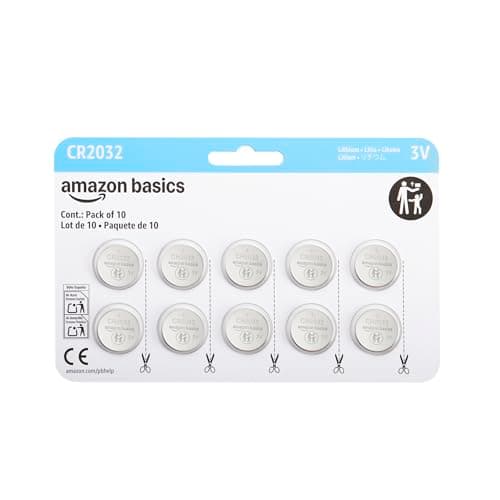
A CR2032 3V lithium coin cell. Not a CR2025 (too thin) and not a CR2477 (that is a Tile Pro). The same cell a Samsung SmartTag2 uses, so one multi-pack covers a mixed household.

The procedure

1. Hold the AirTag with the white plastic side down and the polished stainless cover facing up.

2. Press down firmly on the stainless cover and twist it counterclockwise until it stops. It only moves a short distance.

3. Lift the cover off. The battery is underneath.

4. Take the old cell out. Put the new one in with the positive side facing up — the side with the writing on it.

5. You should hear a chirp. That is the tag confirming power. If there is no chirp, see the section below.

6. Refit the cover, aligning the three tabs with the slots, press down and twist clockwise until it stops.

That is it. The tag keeps its pairing — you do not need to set it up again.

The problem that makes people think the tag is broken

Here is the issue that generates most of the confusion in this area, and it has nothing to do with the AirTag.

Some CR2032 cells have a bitter-tasting coating applied as a child-safety deterrent to discourage swallowing. On many devices it makes no difference. In an AirTag, that coating can sit between the cell and the contact and prevent proper electrical connection.

The symptom is distinctive: a brand-new battery, a tag that will not chirp, and a cell that tests fine on a meter. Apple itself notes that batteries with bitterant coatings may not work with AirTag.

The fix is simply to use an uncoated cell. Do not conclude the tag is dead.

The short answer

Quick picks

Ranked by what each one costs to own for three years, not by sticker price. The plan column is the one most comparisons leave out.

#ProductBest forPlan / 3 yrPrice
01
Amazon Basics CR2032 coin cells (multi-pack)
CR2032 coin cells (multi-pack)

A CR2032 3V lithium cell — the same one a SmartTag2 uses. A multi-pack covers several tags for years and is the entire running cost.

The battery you needNo monthly fee

$0

$9.99Amazon
02
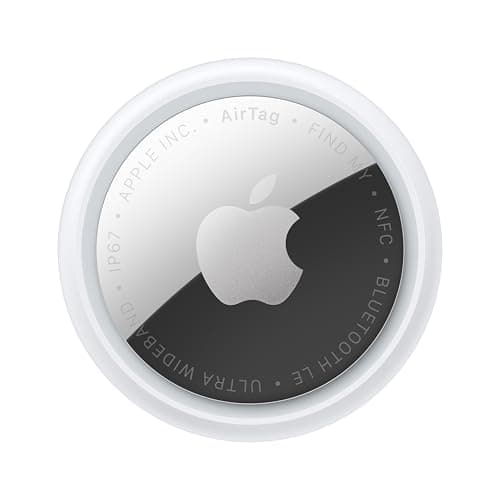
Apple Apple AirTag (2nd generation)
Apple AirTag (2nd generation)

Apple states more than a year per cell based on everyday average usage, so this is roughly an annual job and the whole ongoing cost is about a dollar.

The tag itselfNo monthly fee

$0 + batteries

$24.00Amazon
03
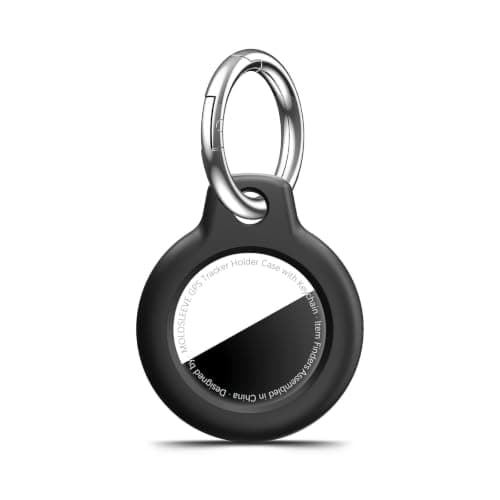
MOLOSLEEVE AirTag keyring case (multi-pack)
AirTag keyring case (multi-pack)

Worth checking before you buy: a holder you have to destroy to change a battery is a holder you replace every year. The good ones pop open.

A holder that lets you get at itNo monthly fee

$0

$4.99Amazon

#ad · Live prices from Amazon's product API, as of October 8, 2026. Where we have no verified live price we show none — a gap beats a number that has rotted. Plan figures are the brands' own published rates, cited in Sources below.

In detail

The picks, in full

Amazon Basics CR2032 coin cells (multi-pack)
$9.99View on Amazon

Price as of October 8, 2026. Prices move — Amazon's at checkout is the one that counts.

#ad · we may earn a commission from this link to CR2032 coin cells (multi-pack)

Top pickNo monthly fee#01 · Amazon Basics

CR2032 coin cells (multi-pack)

The battery you need

A CR2032 3V lithium cell — the same one a SmartTag2 uses. A multi-pack covers several tags for years and is the entire running cost.

The subscription reality

No subscription, now or later. The purchase price is the whole cost of ownership.

Over three years:
$0

Specs, as published by Amazon Basics

  • CR2032 3V lithium
  • Multi-pack
  • The battery used by AirTag and SmartTag2

Good

  • A year of AirTag ownership costs about a dollar in batteries
  • Multi-pack covers several tags for years
  • Universally available

Not so good

  • Some bitter-coated cells do not seat properly in an AirTag — a known, widely reported fit issue
  • Coin cells are a serious swallowing hazard around small children
  • Shelf life is finite

Skip it if

there are toddlers in the house and you will not store these locked away. Coin cells cause severe internal injuries if swallowed.

Apple Apple AirTag (2nd generation)
$24.00View on Amazon

$29.0017% off

Price as of October 8, 2026. Prices move — Amazon's at checkout is the one that counts.

#ad · we may earn a commission from this link to Apple AirTag (2nd generation)

No monthly fee#02 · Apple

Apple AirTag (2nd generation)

The tag itself

Apple states more than a year per cell based on everyday average usage, so this is roughly an annual job and the whole ongoing cost is about a dollar.

The subscription reality

No subscription. The only recurring cost is a CR2032 roughly once a year, which is pennies.

Over three years:
about $3 in coin cells

Specs, as published by Apple

  • User-replaceable CR2032 coin cell; Apple states it runs more than a year
  • IP67 (1 m for up to 30 minutes, IEC 60529)
  • Ultra Wideband Precision Finding, 1.5x the range of the first generation
  • Speaker 50% louder than the first generation

Good

  • No subscription, and Apple has never charged one
  • The Find My network is the largest crowd network in the world, so a lost AirTag in a populated area usually reports within minutes
  • Precision Finding walks you to it by distance and direction, not just a map pin
  • Battery is a coin cell from any supermarket, not a sealed pack

Not so good

  • iPhone only for setup and full use — there is no Android app
  • It has no GPS of its own: it reports when an Apple device walks past it, so it is a finder, not a tracker
  • No keyring hole, so you are buying a holder as well

Skip it if

you are on Android, or you need to watch something move in real time — an AirTag only knows where it was when someone last walked past it.

MOLOSLEEVE AirTag keyring case (multi-pack)
$4.99View on Amazon

Price as of October 8, 2026. Prices move — Amazon's at checkout is the one that counts.

#ad · we may earn a commission from this link to AirTag keyring case (multi-pack)

No monthly fee#03 · MOLOSLEEVE

AirTag keyring case (multi-pack)

A holder that lets you get at it

Worth checking before you buy: a holder you have to destroy to change a battery is a holder you replace every year. The good ones pop open.

The subscription reality

No subscription, now or later. The purchase price is the whole cost of ownership.

Over three years:
$0

Specs, as published by MOLOSLEEVE

  • Shockproof shell with a keyring
  • Fits 1st and 2nd generation AirTag
  • Multi-pack

Good

  • Solves the AirTag's missing keyring hole for pocket change
  • Protects the shell
  • Multi-pack

Not so good

  • Adds bulk
  • Cheap plastic
  • Does not improve the alarm

Skip it if

you are using a Chipolo or SmartTag2 — those already have a hole.

Troubleshooting, in order

No chirp when you fit the battery. First check the orientation — positive side up, writing facing you. Then suspect the bitterant coating and try a different brand of cell. Then check the contacts for debris.

The cover will not twist off. You are probably not pressing hard enough while twisting. It takes real downward pressure, not finesse. Push firmly with your thumb and rotate.

The cover will not go back on. The three tabs have to align with the three slots. Rotate the cover a few degrees and try again — it only seats one way.

It chirps but shows as offline in Find My. Give it a minute and move within Bluetooth range of your phone. If it still does not appear, the issue is pairing rather than power.

Which batteries to buy

A multi-pack of branded CR2032 from a maker you recognize, uncoated. Cheap unbranded cells are a false economy twice over: they have less capacity, and they are more likely to arrive partly discharged after sitting in a warehouse.

Check the date code if there is one. A coin cell loses capacity on the shelf, so a pack manufactured three years ago starts at a disadvantage.

The safety part, which is not optional

Coin cells cause severe internal injuries if swallowed, within hours, through electrolysis rather than poisoning. This is a genuine emergency, not a watch-and-wait, and it is the reason the bitterant coatings exist in the first place.

Practical measures: keep spares in their retail card and locked away, never loose in a drawer. Dispose of the old cell immediately rather than leaving it on a worktop — a partially-discharged cell is still dangerous. And treat an AirTag with a loose or damaged cover as a today problem.

In a house with toddlers, rechargeable tags from Chipolo or Pebblebee remove this issue entirely, which is a real reason to prefer them.

When to do it

When your iPhone tells you, and not later. The notification arrives with time to spare, and the failure mode of ignoring it is a tag that is flat on the day you needed it.

A better habit: once or twice a year, open Find My and ring every tag you own. A tag that does not ring has a dead battery. Two minutes, and it catches the notifications you dismissed without reading.

And check your holder before you buy it — a case you have to destroy to reach the battery is a case you will replace annually.
Questions

Frequently asked

How do I change an AirTag battery?
Hold it stainless-side up, press down firmly on the polished cover and twist counterclockwise until it stops, then lift the cover off. Replace the CR2032 with the positive side — the side with the writing — facing up. You should hear a chirp confirming power. Refit the cover, aligning the three tabs with the slots, and twist clockwise. It keeps its pairing, so there is no need to set it up again.
What battery does an AirTag use?
A CR2032 3V lithium coin cell — not a CR2025, which is too thin, and not a CR2477, which is what a Tile Pro takes. It is the same cell a Samsung SmartTag2 uses, so one multi-pack covers a household running both platforms. Apple states more than a year per cell based on everyday average usage, which makes the whole running cost about a dollar a year.
Why will my AirTag not work with a new battery?
Most likely the bitterant coating. Some CR2032 cells carry a bitter-tasting coating as a child-safety deterrent, and in an AirTag that coating can sit between the cell and the contact and prevent proper electrical connection — Apple itself notes that batteries with bitterant coatings may not work with AirTag. The symptom is a brand-new cell that tests fine and a tag that will not chirp. Use an uncoated cell rather than concluding the tag is dead.
How do I know when my AirTag battery is low?
Your iPhone notifies you, with time to spare. The practical problem is that the notification is easy to dismiss on a busy day, which is how tags end up flat on the day you needed them. The habit worth building is to ring every tag once or twice a year from Find My — a tag that does not ring has a dead battery, and that takes two minutes to find out.
Are coin cell batteries dangerous?
Yes, seriously, and it is the reason the bitterant coatings exist. A swallowed coin cell causes severe internal injuries within hours through electrolysis rather than poisoning, and it is an emergency rather than a watch-and-wait. Keep spares in their retail card and locked away, dispose of the old cell immediately rather than leaving it on a worktop, and in a house with toddlers prefer rechargeable tags, which remove the issue entirely.
Do I need to re-pair the AirTag after a battery change?
No. The pairing is stored in the tag and survives a battery change, so once you hear the chirp and refit the cover it simply reappears in Find My. If it chirps but shows as offline, give it a minute within Bluetooth range of your phone — and if it still does not appear, the problem is pairing rather than power.

Read next

Where the figures came from

Sources

Every specification and plan price on this page traces to one of these, read on the date shown. Device prices are live from Amazon and stamped separately.

  1. Apple — AirTag product page (battery, IP67, Precision Finding) — accessed 2026-10-05
  2. Amazon Product Advertising / Creators API — live prices and product images — accessed 2026-10-05