Skip to content
Tag & Tether

Mechanics & law · How Trackers Work

AirTag anti-stalking features, and their limits

Both platforms detect trackers that are not yours. Here is exactly how, what Apple requires for it to work, and the whole category it misses.

By Mike M.Last updated


When AirTags launched, the obvious worry was that a cheap, tiny, long-lasting tracker on a global network would be used to follow people. Both Apple and Google have since built detection into their operating systems, and it works well for the devices it covers.

It also misses an entire category, and that gap is the most important thing on this page.

What Apple's system does

If an AirTag, a set of AirPods, a Find My network accessory or a compatible Bluetooth location-tracking device is separated from its owner and seen moving with you over time, you are notified — by an alert on your device, or by a sound from the device itself.

Tapping the alert and continuing lets you play a sound to help locate it. On a compatible iPhone with Ultra Wideband, and where the device is an AirTag or an AirPods Pro 3 case, you can tap “Find Nearby” and use directional guidance with distance and direction indicators.

There is also an “Instructions to Disable” option, which walks you through stopping the device. Apple notes something important here: turning off your own Location Services or Bluetooth does not prevent the owner tracking the device. Only disabling the device does.

The requirements, which are specific

These alerts do not work unless your phone is configured for them. Apple states the requirements as:

  • iOS or iPadOS 17.5 or later (14.5 or later for basic notifications)
  • Location Services enabled, with Significant Locations turned on
  • Bluetooth enabled
  • Tracking Notifications enabled
  • Airplane Mode off

Significant Locations is the one people have switched off for privacy reasons and then wonder why they get no alerts. It is worth checking.

What Android's system does

Android alerts you when someone else's tracker is separated from its owner and far from their phone, after the tracker has physically moved with you over time. Supported devices include Find Hub network compatible tags, headphones and Apple AirTags, along with Chipolo, Motorola's moto tag and Pebblebee products.

Crucially, Android adds something Apple does not: a manual scan. Settings → Safety & emergency → Unknown tracker alerts → Scan now. It takes about ten seconds and works on Android 11 and later without Location Services enabled.

Google also notes that turning some trackers off triggers a factory reset, which can prevent law enforcement identifying the owner — worth knowing before you disable one.

The short answer

Quick picks

Ranked by what each one costs to own for three years, not by sticker price. The plan column is the one most comparisons leave out.

#ProductBest forPlan / 3 yrPrice
01
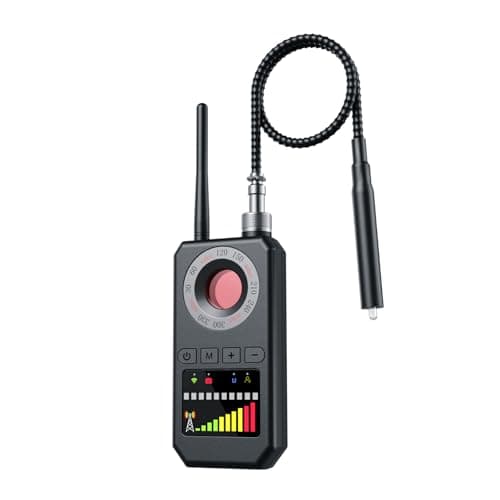
Generic 6-in-1 RF and tracker detector
6-in-1 RF and tracker detector

Neither platform's scan sees a cellular tracker, because they do not use Bluetooth beaconing. An RF detector finds one while it is transmitting — if it is awake.

The gap: cellular trackersNo monthly fee

$0

$37.97Amazon
02
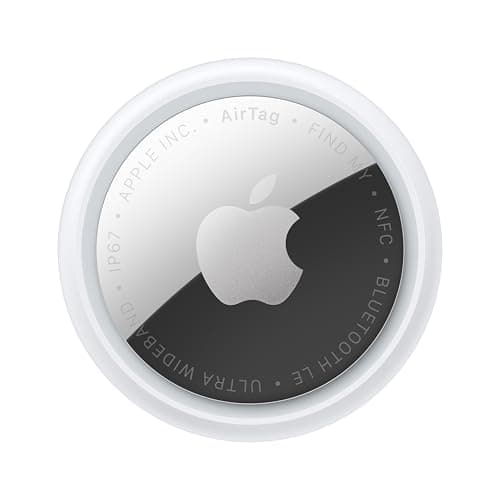
Apple Apple AirTag (2nd generation)
Apple AirTag (2nd generation)

Rotating encrypted identifiers, a sound when separated from its owner, and alerts on nearby phones. The protections are built in rather than bolted on.

The device these features protect againstNo monthly fee

$0 + batteries

$24.00Amazon

#ad · Live prices from Amazon's product API, as of October 8, 2026. Where we have no verified live price we show none — a gap beats a number that has rotted. Plan figures are the brands' own published rates, cited in Sources below.

In detail

The picks, in full

Generic 6-in-1 RF and tracker detector
$37.97View on Amazon

$49.9824% off

Price as of October 8, 2026. Prices move — Amazon's at checkout is the one that counts.

#ad · we may earn a commission from this link to 6-in-1 RF and tracker detector

Top pickNo monthly fee#01 · Generic

6-in-1 RF and tracker detector

The gap: cellular trackers

Neither platform's scan sees a cellular tracker, because they do not use Bluetooth beaconing. An RF detector finds one while it is transmitting — if it is awake.

The subscription reality

No subscription, now or later. The purchase price is the whole cost of ownership.

Over three years:
$0

Specs, as published by Generic

  • Sweeps for RF emissions from active transmitters
  • Also detects camera lenses and magnetic fields
  • Handheld, rechargeable

Good

  • Finds a cellular GPS tracker while it is transmitting, which a phone scan will not
  • The magnet detector is genuinely useful for finding a tracker stuck under a car
  • No subscription

Not so good

  • Will not find a Bluetooth tag reliably — your phone's own scan is better at that
  • Cheap RF detectors false-positive on everything from a router to a car key
  • A cellular tracker that is asleep emits nothing to find

Skip it if

you are looking for an AirTag. Use your phone's built-in unknown-tracker scan — it is free, and it is specifically designed for that.

Apple Apple AirTag (2nd generation)
$24.00View on Amazon

$29.0017% off

Price as of October 8, 2026. Prices move — Amazon's at checkout is the one that counts.

#ad · we may earn a commission from this link to Apple AirTag (2nd generation)

No monthly fee#02 · Apple

Apple AirTag (2nd generation)

The device these features protect against

Rotating encrypted identifiers, a sound when separated from its owner, and alerts on nearby phones. The protections are built in rather than bolted on.

The subscription reality

No subscription. The only recurring cost is a CR2032 roughly once a year, which is pennies.

Over three years:
about $3 in coin cells

Specs, as published by Apple

  • User-replaceable CR2032 coin cell; Apple states it runs more than a year
  • IP67 (1 m for up to 30 minutes, IEC 60529)
  • Ultra Wideband Precision Finding, 1.5x the range of the first generation
  • Speaker 50% louder than the first generation

Good

  • No subscription, and Apple has never charged one
  • The Find My network is the largest crowd network in the world, so a lost AirTag in a populated area usually reports within minutes
  • Precision Finding walks you to it by distance and direction, not just a map pin
  • Battery is a coin cell from any supermarket, not a sealed pack

Not so good

  • iPhone only for setup and full use — there is no Android app
  • It has no GPS of its own: it reports when an Apple device walks past it, so it is a finder, not a tracker
  • No keyring hole, so you are buying a holder as well

Skip it if

you are on Android, or you need to watch something move in real time — an AirTag only knows where it was when someone last walked past it.

The gap: cellular trackers are invisible to both

This is the most important limitation and it is barely mentioned anywhere.

Both systems work by listening for Bluetooth beacons. A cellular GPS tracker does not beacon — it talks to a cell tower. So a hidden cellular tracker in a car or a bag is completely invisible to your phone's unknown-tracker scan, on either platform, forever.

Those devices are widely available, cost under twenty dollars, and are magnetic. If your concern is someone tracking your vehicle, the phone scan will not find it and you need a physical search or an RF detector instead. That is a different procedure and we cover it here.

Four other limitations worth knowing

Alerts need time and movement. The system wants to see a tracker moving with you over a period, which prevents constant false alarms from tags in shops and taxis — and means a short journey may not trigger anything.

Alerts are suppressed near the owner. A tag traveling with its owner is not “separated”, so a tracker planted by someone who is also present will not alert you. That matters in domestic situations specifically.

Older phones and feature phones get nothing. Apple's full feature set needs iOS 17.5 or later, and Android's manual scan needs Android 11 or later. Someone on an old handset is unprotected.

The sound can be defeated. A tag's speaker can be physically disabled, and tags sold with the speaker removed have been reported. The phone alerts still fire, which is why the notification matters more than the chirp.

What to check on your own phone today

iPhone: Settings → Privacy & Security → Location Services (on), → System Services → Significant Locations (on). Then Find My → Tracking Notifications (on). And keep iOS current.

Android: Settings → Safety & emergency → Unknown tracker alerts. Turn alerts on, and note the Scan now button for when you want to sweep deliberately.

Five minutes, and it is the difference between protection that works and protection that is technically present.

If you find a tracker that is not yours

Do not immediately disable it if you think you may want to involve the police. Google notes that turning some trackers off triggers a factory reset, which can destroy the link to the owner — and that link is the evidence.

Photograph the device in place, with its serial number if visible. On an iPhone or Android phone you can tap an AirTag with NFC to see its serial and any lost-mode message. Keep the alert notification.

If you believe you are being followed, contact local law enforcement, and consider that a domestic-violence advocacy organization can help with the wider situation. Please do not treat a tracker as a problem to solve alone.

We go through the practical detection steps in full on the unwanted-tracker detection page.
Questions

Frequently asked

How do AirTag anti-stalking features work?
If an AirTag or compatible Bluetooth location-tracking device is separated from its owner and seen moving with you over time, you get a notification on your device or hear a sound from the device itself. Tapping through lets you play a sound to locate it, use directional Find Nearby guidance on a UWB iPhone, and get instructions to disable it. Apple notes that turning off your own Location Services or Bluetooth does not stop the owner tracking the device.
What settings do I need for unwanted-tracking alerts to work?
Apple states the requirements as iOS or iPadOS 17.5 or later, Location Services enabled with Significant Locations turned on, Bluetooth enabled, Tracking Notifications enabled, and Airplane Mode off. Significant Locations is the one people switch off for privacy reasons and then wonder why no alerts arrive — it is worth checking. On Android, the controls are under Settings, Safety & emergency, Unknown tracker alerts.
Can Android detect AirTags?
Yes. Android's unknown tracker alerts cover Find Hub network compatible tags and Apple AirTags explicitly, along with Chipolo, Motorola's moto tag and Pebblebee products. Android also has something Apple does not: a manual Scan now under Settings, Safety & emergency, Unknown tracker alerts, which takes about ten seconds and works on Android 11 and later without Location Services enabled.
What can the anti-stalking features not detect?
Cellular GPS trackers, which is the most important limitation and rarely mentioned. Both platforms work by listening for Bluetooth beacons, and a cellular tracker does not beacon — it talks to a cell tower. So a hidden cellular tracker in a car or bag is invisible to your phone's scan on either platform. Those devices are widely available and magnetic, and finding one means a physical search or an RF detector.
Will I be alerted if the person who planted the tracker is nearby?
Probably not, and this matters in domestic situations specifically. The alerts are triggered by a tracker that is separated from its owner — a tag traveling with the person who owns it is not separated, so no alert fires. If you suspect someone close to you is tracking you, the automatic alerts are not sufficient protection and a manual search plus outside help is the right approach.
Should I disable a tracker I find?
Not immediately if you may want to involve the police. Google notes that turning some trackers off triggers a factory reset, which can prevent law enforcement identifying the owner — and that link is the evidence. Photograph the device in place with its serial number if visible, keep the alert notification, and contact local law enforcement. A domestic-violence advocacy organization can help with the wider situation.

Read next

Where the figures came from

Sources

Every specification and plan price on this page traces to one of these, read on the date shown. Device prices are live from Amazon and stamped separately.

  1. Apple Support — if you get an alert that an AirTag or Find My network accessory is with you — accessed 2026-10-05
  2. Google — unknown tracker alerts on Android — accessed 2026-10-05
  3. Apple — AirTag product page (battery, IP67, Precision Finding) — accessed 2026-10-05
  4. Amazon Product Advertising / Creators API — live prices and product images — accessed 2026-10-05